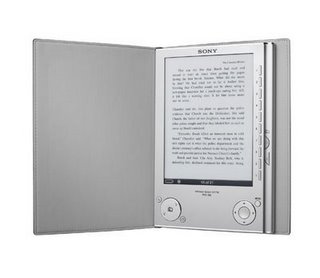
Library of Alexadria Update


Well, back in march I blogged about my intention to build my ebook library up to the level of the famed library of Alexandria– 50,000 books. I’m not there yet, but I just passed 2000 ebooks*. Coincidentally this happened on the same day that Google announced it will begin selling ebooks to be read online. They have said that they don’t see ebooks tied to a specific device. I hope this doesn’t mean they won’t be available for ereaders, because if that is the case, I think they are missing the boat. If you are a reader and you haven’t tried a Sony PRS or a similar device, you should.

* During the same period, I’ve read 18, but my “to be read” list is really growing.

The Ease of eBooks

A great deal has been written about how easy it is to purchase and download a book on the Amazon Kindle. The Sony PRS Reader is only slightly less convenient in this regard. On more than one occassion I have seen a book being discussed on TV, went to my computer and purchased it, and then connected the Reader and transfered the book to it before the discussion was over. This week I got an add for a book by email, looked for the book online to see if it was available in eBook form (it was), and then purchased and downloaded it. This may not be the most compelling reason to buy an eBook Reader, but it is so nice, not to have to wait to go to the bookstore or the library to get the book you want.

Sony PRS-505 as an Ipod

As regular readers will remember, my beloved mp3 player died a few weeks ago. One of the reasons for my purchase of the Sony Reader was its ability to play mp3s. The internal memory of the PRS-505 is a tiny 256 megs, but there are two memory card slots– one for a Sony Memory Stick and one for an SD card.

Books take up very little memory. I now have 320 books on my reader and have filled up only a teeny pie slice of one data card. Mp3s on the other hand use a bit o’ memory, so I bought a 2 gig Sony Memory Stick Pro Duo, and a 4 gig SDHC card. So far I have only a dozen or so songs loaded but I have room for almost as many as I had on my GoGear. Note: The Sony Reader will play mp3s, but not wma files.

I read on my Sony Reader all the time, but I’ve only plugged in earbuds once or twice. The sound is top notch, but I’m so into my reading that I forget all about the music.

Addition: I plugged my Reader into my speaker system to listen to music last night and it stopped twice– once at the end of a song and once in the middle. I’ve got to check it out and see if there is something wrong with those two particular mp3s.

Sony PRS-505 and Calibre

I love my new Sony PRS-505 book reader. I’m not going to get involved in the format wars. I considered a Kindle before I bought my Sony after all, and I gave that up back in 1985 when I bought my Amiga. What I will tell you is that you won’t be disappointed in a digital book reader if you are a book lover. They are great. I’ve been reading much more than I have in a long time.

If you buy a Sony Reader, you must download the Calibre program. You can get it here. This program allows you to convert just about any ebook format into the native Sony format. In fact, the ebooks converted this way can be created with all the possible features enabled, such as hotlinked tables of contents. Though the reader displays pdf files just fine, I find that I can make them easier to read by converting them with Calibre. I can change the font size and set up a table of contents in about twenty seconds.

Sony PRS-505 Reader

I posted not too long ago about my interest in the Amazon Kindle. Well my birthday came along and I had my choice of gadgets. What did I get?… The Kindle’s main competitor, the Sony Reader PRS-505. I don’t know why I decided to go with the Sony over the Kindle. It was just kind of a gut decision, but I’m not having any buyer’s remorse… at least no more than I would have for spending three Franklins on anything. So far I am loving the little Reader. I keep waiting for someone to ask me what I have there, so I can say “a book”. And then when they ask me which book, I’ll say “All of them.” You can expect that I’ll be posting a lot about the Reader over the next few weeks, but here is a quick rundown.

The reader is primarily a book reader. It’s screen is not backlit and it really is like reading a book. It also plays mp3 music though, and it sounds as good as my late lamented mp3 player. It displays pictures as well, though they are in black and white. It has a bit of memory built in– enough to hold 160 books, but not much if you want a bunch of music. However it has two memory slots: one for a Sony memory stick duo, and one for an SD memory card. It does support SDHC. I have a 4 meg SDHC and a 2 meg Sony stick in right now. You can buy ebooks using the supplied library software from the Sony/Borders website. You get 100 free classic books when you buy the reader. Free books can be found all over the web– from manybooks.com, feedbooks.com, and publishers’ websites. Baen books has a ton of great sci-fi for free download. You can’t pay to get newspapers delivered to your Reader like you can with the Kindle, but you can get the equivalent for free from feedbooks.com using their feedbooks News Stand software gadget.

Stay tuned for tips, tricks, and goodies as I discover them. I will surely post them.